

Kubernetes Cost Allocation
How Kubernetes costs are calculated
Cloudchipr splits each node's amortized hourly cost across the pods it runs, in proportion to requested CPU and memory, then rolls that up by workload, namespace, node, and cluster.
The idea in one lineCloudchipr takes the amortized hourly cost of every node, split it across the node's CPU and memory, and charge each workload for the share it requests. Whatever the workloads don't use stays visible as idle cost.
How it works, step by step
1. Start from each node's amortized cost
Every node has an amortized hourly cost, meaning the effective price you pay once Spot discounts and commitments are spread across usage. A Spot node is costed at its Spot rate; an On-Demand node at its On-Demand rate. No list-price estimates are used.
2. Split the node price into CPU and memory
A node's hourly cost is divided between the CPU it provides and the memory it provides. This gives every CPU-hour and every GB-hour on that node a price.
3. Allocate to workloads by what they request
Each pod, workload, and namespace is charged for the CPU and memory it requests, as its share of the node it runs on. Request more, pay more; request less, pay less.
4. Add it up over time
Costs are summed across every hour your workloads ran, then rolled up by workload, namespace, node, and cluster, including nodes that scaled up for an hour and disappeared.
Where a node's cost goes
One node's hourly cost equals 100% of the price you pay, and it is divided into two kinds of line items:
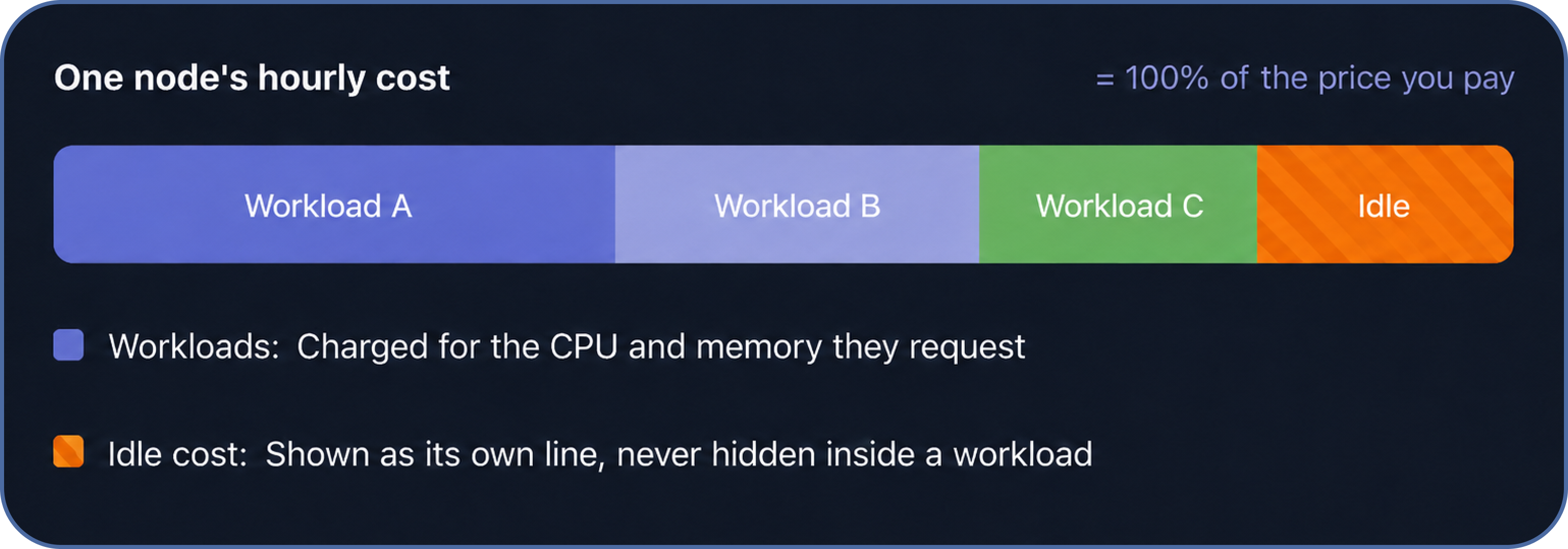
The workload slices plus the idle slice always add up to exactly what the node costs. Nothing is invented and nothing is lost, which is why idle cost is a reliable signal for right-sizing.
Why the price is often lower than an On-Demand estimate
Amortized cost includes your Spot savings. Clusters that use Spot capacity are billed at the Spot rate, which is typically 50 to 70% below the On-Demand list price for the same hardware. If you estimate cost from On-Demand rates, Cloudchipr will look lower, because you're only paying the Spot price.
Example node: 16 vCPU / 64 GB
| On-Demand list | Spot (what you pay) | You save | |
|---|---|---|---|
| Hourly | $0.85 / hr | $0.42 / hr | ~50% |
| Over a full month | ~$620 | ~$310 | ~$310 |
How you see it in Billing Explorer
Kubernetes cost appears alongside the rest of your cloud spend, and you can break it down the way your teams are organized.
Group and filter. Break cost down by cluster, namespace, workload, node, or label, and filter to any team, environment, or time range.
CPU and memory, separately. Each workload shows its CPU cost and its memory cost as distinct components, so you can see what's driving the bill.
Idle cost in the open. Idle node capacity is its own line rather than being spread across workloads, which makes over-provisioning easy to spot and reduce.
Shared clusters, fair splits. On a shared cluster, each namespace pays only for the resources it requests. One team's usage never inflates another's cost.
SummaryCosts reflect the amortized cost of each node (On-Demand or Spot), allocated to workloads by requested CPU and memory, summed over the hours the resources ran.
Updated 3 months ago